
Excel Fast Filter
To not wasting time by navigating to Data tab and click on filter then going to the column to filter it with typing the value to be filtered at, you simply can use this utility Filter to do it faster as explained in below. Dose for Excel‘s Filter utility can easily do this with one click.
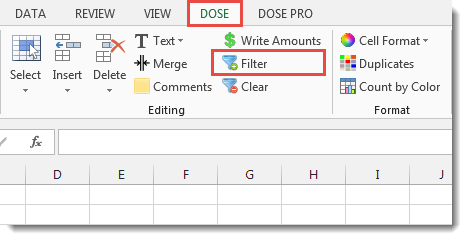
Click DOSE » Filter
Usage:
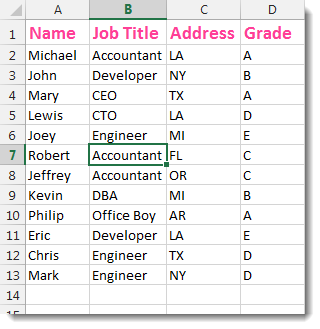
- Select a cell that you want to filter the whole column according to it.
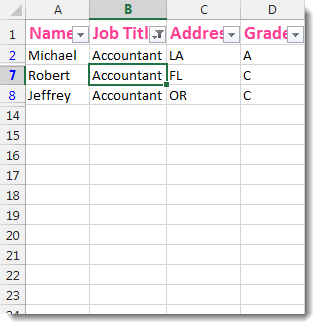
- And then click DOSE » Filter. The utility will filter the column based on the selected cell value. If you want to clear the filter then Click DOSE » Clear to clear the current filter. In below example, we filter the column “B” with value “Accountant”. See screenshots:

More Features:
Excel Delete Blank Sheets
Delete All Empty Worksheets Excel Delete all blank or empty sheets in Excel one time…
Excel Convert Hyperlinks
Extract URL’s From Hyperlinks Or Convert Plain Text Cells Into Hyperlinks In Excel Easily convert…
Excel Cells Color Assistant
Advanced Cells Formatting And Coloring In Excel Build your format and color templates by yourself,…
Excel Extend Selection To The Last Used Column
Easily Extend Selection To The Last Used Column Normally if you want to select a…
Dose For Excel Settings
Edit Settings of Dose for Excel Using Dose for Excel settings, you can configure what…
Excel Batch Insert Option Buttons
Batch Insert Option Buttons In Excel Insert a batch of option buttons into selected cells…