
Highlight the Active Row & Column in Excel with One Click
Reading a wide spreadsheet row by row is a constant source of mistakes – your eyes drift up or down a row and suddenly you are looking at the wrong customer’s data, the wrong invoice, the wrong line item. Excel has no built-in cross-hair highlight or focus mode for the active cell. Dose for Excel adds one as a single ribbon toggle: Reading Layout View. Click any cell and a coloured cross instantly lights up that cell’s entire row and entire column, so your eye never leaves the row you are reading. The cross follows your active cell live as you click around, the colours are fully customizable, and nothing in your file is permanently changed.
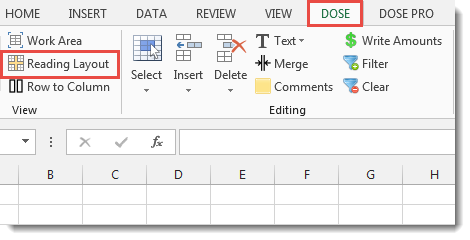
Click DOSE » Reading Layout
Why Excel Users Need a Cross-Hair Highlight
Most spreadsheets are wider than your screen. By the time your eye scrolls right to find a value, it has lost track of which row that value belongs to. The classic Excel workaround is Freeze Panes – but that only locks headers, not the row your cursor is on. Power users sometimes write VBA macros that listen for selection changes and paint the active row, but those break on protected sheets, fail on multi-cell selections, and require enabling macros on every workbook.
The Dose for Excel Reading Layout View solves this with a single toggle. The cross-hair lights up the row and column of the active cell, follows you live as you move, and never modifies your underlying spreadsheet.
Key Features at a Glance
- One-click toggle – turn the cross-hair on or off from a single button on the Dose ribbon.
- Cross-hair highlight – instantly lights up the active cell and its entire row + entire column with two distinct colours.
- Live tracking – the cross automatically follows your active cell as you click around the sheet, with no extra clicks.
- Two-tier colour scheme – the active cell gets one colour, the row + column cross gets another, so the focused cell is always easy to spot.
- Fully customizable colours – change the active-cell background, active-cell font, cross background, and cross font from the Dose Settings dialog.
- Non-destructive – the highlight uses Excel’s native Conditional Formatting, so it overlays your data without modifying any cell’s actual format.
- Clean toggle off – when you turn Reading Layout off (or close the workbook), the overlay is removed completely and your original cell formatting is restored exactly as it was.
- Settings remembered – your custom colours are saved per user, so they are applied automatically every time you turn Reading Layout on.
- Works in every modern Excel version – Excel 2010, 2013, 2016, 2019, 2021, 2024 and Microsoft 365, both 32-bit and 64-bit.
How to Turn On Reading Layout in Excel (Step by Step)
- Install Dose for Excel and open any workbook – the DOSE ribbon tab appears automatically.
- Click the cell you want to start reading from.
- Click DOSE » Reading Layout – the toggle button switches on and the cross-hair appears immediately on the active cell’s row and column.
- Click around the sheet – the cross automatically follows your active cell, no extra clicks needed.
- To turn the highlight off, click the Reading Layout button again. The overlay disappears and your sheet returns to its original look.
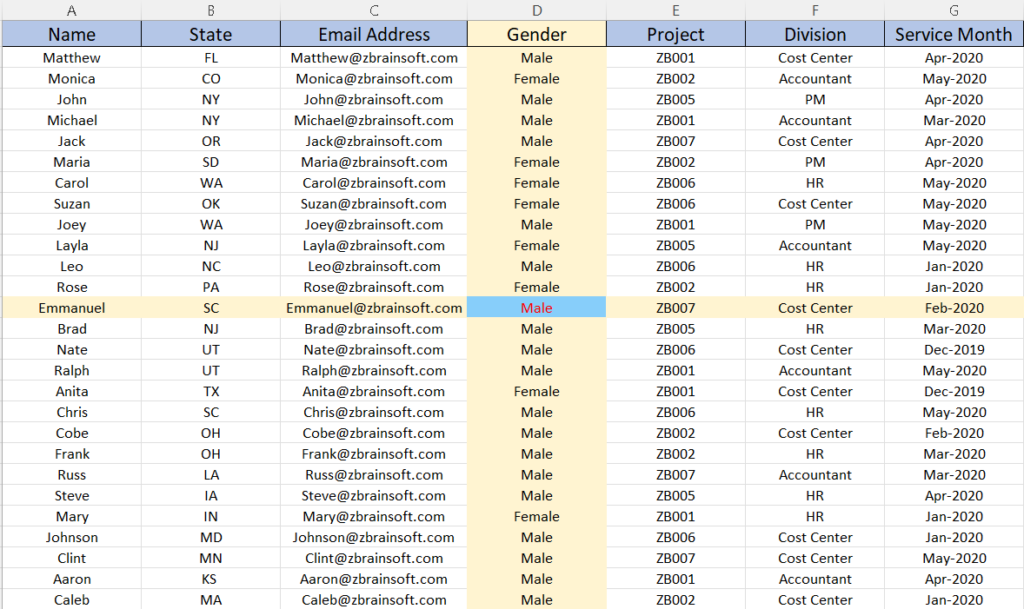
The Cross-Hair Follows Your Active Cell Automatically
This is what makes Reading Layout different from a static highlight or a manual paint-the-row macro: the cross is live. Behind the scenes, Dose for Excel listens to Excel’s SheetSelectionChange event, removes the previous highlight, and re-applies the cross to whatever cell you just clicked – all in a few milliseconds, so it feels instantaneous.
Move with the arrow keys, click anywhere, jump with Ctrl+Home – the cross is always exactly where you are. There is no need to keep toggling the button or selecting a cell first.
Customize the Highlight Colours
Out of the box, Reading Layout uses two carefully picked colours: a soft pink for the cross row + column, and a sky-blue + red combination for the active cell itself. If those don’t fit your brand or if you find a different combination easier to read, every colour is configurable from the Dose for Excel Settings dialog.
- Active cell – background colour (default LightSkyBlue)
- Active cell – font colour (default Red)
- Cross row + column – background colour (default light peach
#ffefe6) - Cross row + column – font colour (default Black)
Pick whatever combination works for your eyes – your settings are remembered per user and applied automatically every time you switch Reading Layout on.
It’s Non-Destructive – Your Original Formatting Is Safe
Reading Layout uses Excel’s native Conditional Formatting engine to paint the cross. That matters because conditional formatting is an overlay: it does not replace or modify any cell’s existing fill colour, font, or borders. As long as Reading Layout is on, you see the cross. The instant you toggle it off – or close the workbook – every overlay rule is removed and your sheet looks exactly as it did before, down to the last cell.
Demo: Reading Layout in Action
Frequently Asked Questions
How do I highlight the active row and column in Excel?
Excel has no built-in cross-hair or focus mode for the active cell. With Dose for Excel installed, click DOSE » Reading Layout once. The toggle turns on and a coloured cross instantly highlights the active cell’s entire row and entire column. Click any other cell and the cross follows you automatically.
Does Excel have a built-in reading mode or focus mode?
No. Excel’s Freeze Panes can lock header rows or columns in place, but it does not highlight the row or column of the active cell. There is no native equivalent of Word’s Focus mode in Excel. Dose for Excel adds Reading Layout View to fill that gap with a single ribbon toggle.
Does the highlight follow my active cell as I move around?
Yes. Reading Layout listens to Excel’s selection-change event and re-paints the cross every time you click a different cell or move with the arrow keys. There is no need to re-toggle the button or re-select cells – the cross is always on the cell you are currently focused on.
Can I change the highlight colours?
Yes. All four colours – the active cell’s background and font, and the cross row + column’s background and font – are configurable from the Dose for Excel Settings dialog. Defaults are LightSkyBlue + Red for the active cell and a soft peach (#ffefe6) + Black for the cross. Your colour choices are saved per user and re-applied automatically every time you turn Reading Layout on.
Will Reading Layout modify my original cell formatting?
No. The highlight is implemented with Excel’s native Conditional Formatting engine, which is an overlay – it does not replace or alter any cell’s actual fill, font, or borders. The instant you toggle Reading Layout off, the overlay is removed and your sheet looks exactly as it did before, including any conditional formatting rules of your own.
How do I turn Reading Layout off?
Click the same DOSE » Reading Layout button again. The toggle switches off, the cross-hair overlay is removed from the worksheet, and your original formatting is restored exactly as it was. Reading Layout is also automatically cleaned up when the workbook closes.
Does it work on protected sheets or large spreadsheets?
Yes. Because the highlight is an Excel Conditional Formatting overlay – not a direct write to cells – it works on read-only and protected sheets, large used ranges, and sheets with their own conditional formatting rules. There is no manual painting, no VBA macro, and no need to enable macros on the workbook.
Which Excel versions are supported?
Dose for Excel works with Excel 2010, 2013, 2016, 2019, 2021, 2024 and Microsoft 365, both 32-bit and 64-bit, on Windows.
Related Dose for Excel Tools
If Reading Layout helped you read big spreadsheets, these related Dose for Excel view-and-navigation tools usually save the same kind of eye-strain:
- Work Area View – maximize your viewing space by hiding the formula bar, status bar and minimizing the ribbon, all from a single click.
- Row to Column View – read very wide rows in a separate two-column pane, side by side – no horizontal scrolling.
- Excel Navigation Pane – jump between every workbook and worksheet from one pane, with filters for charts, pictures and pivot tables.
- Cells Color Assistant – build and reuse your own format-and-colour templates so you can apply consistent highlights across workbooks.
- Browse all Dose for Excel features – 100+ tools that speed up everyday Excel work.
More Features:
Excel Export Sheets
Export Sheets Separately In Different Formats In Excel Exporting from sheets from Excel using Excel…
Excel Count Chars
Count Chars In Excel Count chars in a cell or in a selected range of…
Excel Navigation
Navigation to Excel Sheets If you have many opened workbooks and want to navigate to…
Excel Delete Rows
Excel Highlight Or Delete Any Type Of Rows Highlight or delete items that are identical,…
Excel Split
In Excel, split the first and last word, or divide them by a delimiter or…
Excel Batch Insert Option Buttons
Batch Insert Option Buttons In Excel Insert a batch of option buttons into selected cells…