
Excel Row To Column

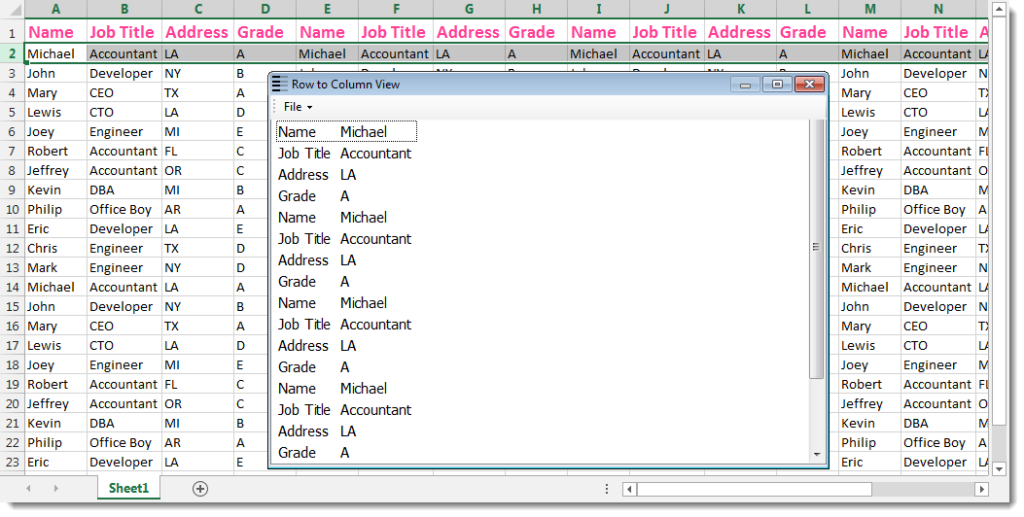
Excel row to column utility will help you view a large row data in separate window including 2 columns which present the row cells data in an easy way to view. Dose for Excel‘s Row to Column utility can do this easily with one click.
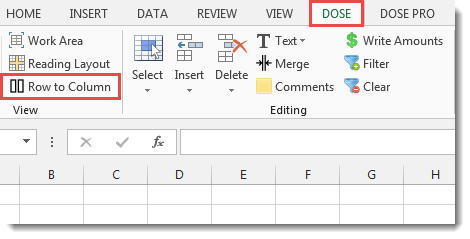
Click DOSE » Row to Column

Usage:
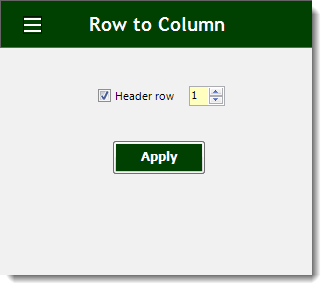
- Select a row that you want to view in row to column window.
- If there is a header then check Header row option.
- Ability to print out the result or even save it to text.
- Then click Apply. You will see the result as shown in the below screenshot.
Demo
More Features:
Excel Advanced Functions
Use Built-In Advanced Functions In Excel You can quickly use built-in functions without writing VBA…
Excel Clean Data
Clean Data in Excel — Trim, Change Case & Convert in One Click Messy spreadsheets…
Excel Delete Illustrations And Objects
Delete Illustrations and Objects In Excel Sheets If you ever had many sheets including a…
Excel Cells Color Assistant
Advanced Cells Formatting And Coloring In Excel Build your format and color templates by yourself,…
How to Select Interval Rows or Columns in Excel
Select Interval Rows Or Columns In Excel Easily select interval rows or columns, for example,…
Excel Sort Sheets
Sort Sheets by alphanumeric or date In Excel Sort your sheets in your current workbook…