
Import Files Names From Your Folder Into Excel
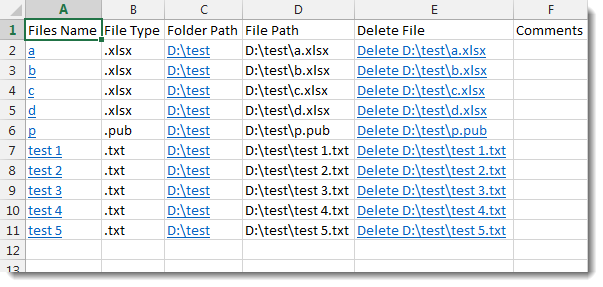
Import your directory or folder files names into excel sheet with hyperlink to open files regardless of its type. It will show files names, paths, folder path, file type, delete option and comments. This feature has been created to facilitate organizing and setting comments for your files on hard disk and make them easy to access. A delete option can be shown beside each file name to delete the physical file from your hard disk and Excel. You can set also a file type filter (ex: TXT) then only text files names will be imported into your excel. Dose for Excel‘s Files Lister utility can easily do this with one click.
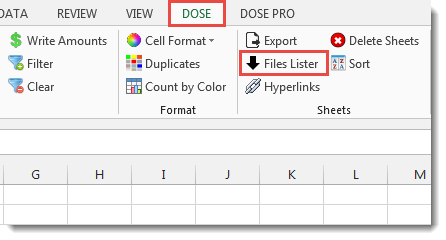
Click DOSE » Files Lister


Usage:
- Select the folder that you want to list its files names into Excel in the Folder Path box.
- Fill in the Files Type box the extension of files you want to import their names such like (TXT or XLSX or whatever).
- You can add other extra columns by checking Files Types, Delete Option, File Path, Folder Path options.
- And then click Import. See screenshots:

More Features:
Excel Extend Selection To The Last Used Column
Easily Extend Selection To The Last Used Column Normally if you want to select a…
Excel Compare Sheets – Advanced Excel Sheet Comparison Tool
Why Compare Excel Sheets? When working with finance reports, inventory audits, or versioned data sets,…
Excel Remove Or Replace Comments
Advanced Comments Assistant For Excel If you ever want to remove comments or replace them…
Excel Remove By Position
Remove characters by position from text in Excel If you ever want to remove a…
Compare Lists in Excel
Compare Lists in Excel If you ever want to compare lists by looking up for…
Excel Reading Layout View
Highlight the Active Row & Column in Excel with One Click Reading a wide spreadsheet…